Broadcasting Messages & Campaign Management in Seen
The Broadcasts Module in Seen harnesses the official WhatsApp Business Cloud API to deliver personalized mass outbound communications at enterprise scale. Delivering open and read rates frequently exceeding 90%—vastly outpacing traditional SMS and email channels—Seen enables marketing directors, e-commerce brands, and customer success teams to re-engage inactive customers, announce VIP promotions, and dispatch critical service advisories seamlessly.
1. Broadcast Management Lifecycle Tabs
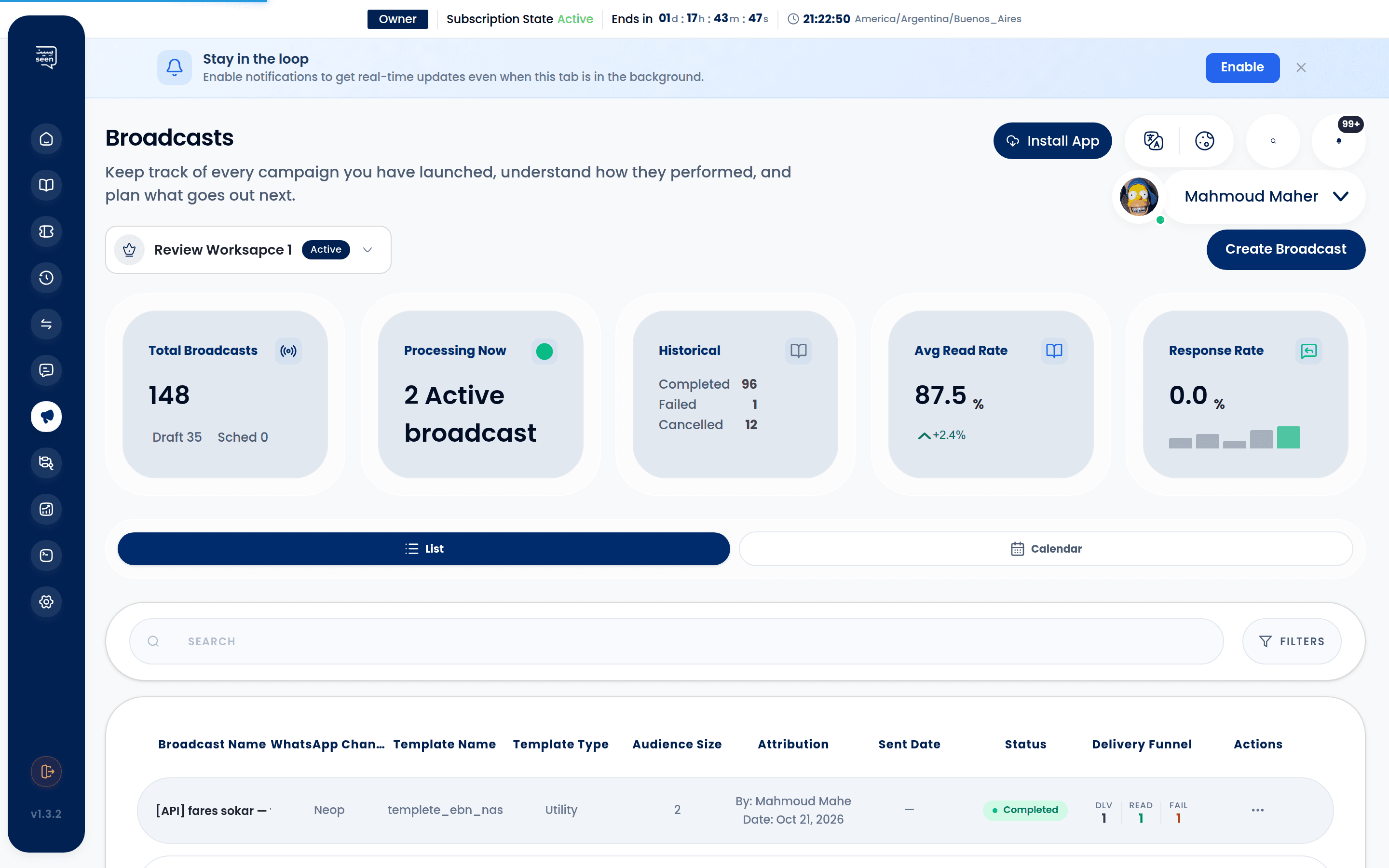
The broadcast cockpit organizes campaigns into three dedicated functional tabs:
A) Active Broadcasts
Displays all outbound campaigns actively executing across Seen's dispatch pipelines.
- Features a live progress bar tracking real-time delivery percentages.
- Equips supervisors with instant Pause and Cancel controls for operational safety.
B) Drafts
Houses campaigns in preparation whose audience, template, or variable mappings are still undergoing internal review.
- Easily revise variable parameters, adjust recipient lists, or modify dispatch schedules prior to launch.
C) History & Completed Broadcasts
Comprehensive archive of past campaigns, complete with delivery telemetry and performance statistics.
- Compare deliverability, open rates, and click-through performance across historical campaigns.
2. Campaign Status Lifecycle
Broadcast campaigns transition through standardized execution states represented by system enums:
| Status Code | Status Name | Badge Variant | Operational Description |
|---|---|---|---|
| 1 | Draft | Slate / Gray | Campaign configuration is ongoing and not yet authorized for dispatch. |
| 2 | Scheduled | Blue | Scheduled for automated dispatch at a designated future date and time. |
| 3 | Preparing | Amber | System is compiling audience lists and validating variable placeholders. |
| 4 | RecipientsReady | Violet | Contacts verified against E.164 formats; queue primed for dispatch. |
| 5 | Running | Pulsing Green | Messages are actively dispatching through Meta's Cloud API endpoints. |
| 6 | Paused | Amber | Manually paused by an administrator to review customer feedback. |
| 7 | Completed | Emerald Green | All outbound messages successfully processed and dispatched. |
| 8 | Cancelled | Dark Red | Execution aborted by an administrative command. |
| 10 | AutoPaused | Orange Warning | Automatically suspended by Seen's safety engine due to elevated bounce rates. |
| 11 | Failed | Bright Red | Aborted due to channel authentication failure or quota exhaustion. |
3. Real-Time Delivery Analytics Funnel
Selecting any completed or active campaign opens the granular analytics drawer:
Broadcast Delivery Funnel:
Total Targeted Audience
        │
        ▼
[Sent] ──► Dispatched from Seen to Meta Cloud API servers
        │
        ▼
[Delivered] ──► Handset receipt acknowledged (Double gray checkmarks)
        │
        ▼
[Read] ──► Message opened by recipient (Double blue checkmarks)
        │
        ▼
[Failed] ──► Delivery bounced (unregistered numbers or carrier blocks)
- Deliverability Rate: Delivered count divided by Total Sent (Target benchmark: >95%).
- Read Rate: Read count divided by Delivered count (Target benchmark: 60% – 85%).
- Inbound Reply Handoff: Whenever a recipient replies to a broadcast message, Seen automatically spins up an active ticket in the Omnichannel Inbox for instant sales or support assistance.
4. Meta Quality Ratings & 24-Hour Messaging Tiers
Meta enforces strict quality standards to safeguard the WhatsApp messaging ecosystem against spam:
Rolling 24-Hour Messaging Tiers
Your official Meta phone number tier dictates how many unique recipients you can message per rolling 24-hour window:
| Messaging Tier | Daily Unique Contacts Limit | Requirement for Next Tier Promotion |
|---|---|---|
| Sandbox (Tier 0) | 250 Contacts | Verify business profile in Meta Business Manager |
| Tier 1 | 1,000 Unique Contacts | Maintain high quality while utilizing tier capacity |
| Tier 2 | 10,000 Unique Contacts | Utilize at least 50% of Tier 1 limit over 7 consecutive days |
| Tier 3 | 100,000 Unique Contacts | Utilize at least 50% of Tier 2 limit with Green rating |
| Tier 4 | Unlimited | High-volume enterprise status with exemplary reputation |
Phone Number Quality Rating
- Green (High Quality): Outstanding standing; negligible customer blocks or spam reports.
- Yellow (Medium Quality): Elevated block rates detected; Meta warning active.
- Red (Low Quality): Critical threshold; risks tier demotion or account suspension.
5. Automated Safety Guard (Auto-Pause Mechanism)
To protect your official WhatsApp number from permanent Meta bans, Seen incorporates an automated safety circuit:
- During active execution, the pipeline continuously tracks bounce and failure ratios.
- If invalid or non-WhatsApp numbers exceed 15% of the dispatched batch, the system triggers an Auto-Pause, halting subsequent messages instantly and alerting managers via the Notification Center.
- This protective intervention shields your account from dropping to a Red quality rating.
6. Strategic Best Practices for Mass Outreach
- Enforce Verified Opt-In: Never purchase third-party lead databases. Message only customers who have explicitly opted into receiving updates from your business.
- Segment Intelligently: Avoid blasting your entire audience with identical promotions. Utilize Tags & Categories to target specific customer personas.
- Inject Personalization: Always map the recipient's first name into variable
{{1}}to cultivate personal connection. - Include an Opt-Out Option: Offer a simple Quick Reply button allowing contacts to unsubscribe, preventing them from hitting WhatsApp's native "Report & Block" button.
Frequently Asked Questions
Do mass broadcasts require pre-approved WhatsApp Templates?
Yes. Meta strictly mandates that all business-initiated conversations outside the active 24-hour customer service window must utilize pre-approved WhatsApp Message Templates.
What happens if I attempt to broadcast to 5,000 contacts while in Tier 1?
Seen will dispatch messages to the first 1,000 contacts and automatically suspend subsequent dispatches with a Tier Quota Exceeded log, ensuring your business profile remains strictly compliant with Meta policies.
Can I schedule a broadcast campaign for midnight?
While technically supported in Broadcast Campaign Creation, we strongly advise scheduling broadcasts during daytime business hours to maximize engagement and prevent customer irritation.