External REST API, Request Logs & MCP Keys in Seen
The External API & Webhooks module in Seen transforms your communication workspace into an extensible, programmatic hub. Designed for software engineers, systems integrators, and automation architects, Seen's RESTful endpoints and real-time event webhooks facilitate bidirectional synchronization with enterprise CRMs, custom ERP systems, e-commerce stores (Shopify, Salla, Zid), and autonomous AI agents powered by the Model Context Protocol (MCP).
1. REST Architecture & Production Base URL
Seen's APIs follow strict REST conventions, utilizing standard HTTP verbs, predictable resource paths, and UTF-8 JSON payloads:
Production Base URL:
https://seen-api.neop.co/api/user/v1
Authentication Header Standard
All programmatic requests must supply an active API key via the standard HTTP Authorization header:
Authorization: Bearer sec_live_9f8e7d6c5b4a3210...
Content-Type: application/json
Accept: application/json
2. The Four Specialized Integration Tabs
Within Settings > External API, technical operations are organized across four specialized tabs:
External API Architecture:
┌──────────────┬────────────────┬──────────────────────┬─────────────┐
│   API DOCS   │    API KEYS    │       API LOGS       │  MCP KEYS   │
│ (Interactive)│ (Scoped Keys)  │    (Live Telemetry)  │ (AI Tools)  │
└──────────────┴────────────────┴──────────────────────┴─────────────┘
A) Interactive API Documentation (API Docs)
- Real-time interactive OpenAPI/Swagger schemas detailing all available endpoints, required request headers, and response payloads across multiple programming languages.
- Execute sandbox API calls directly inside your browser to inspect live JSON responses.
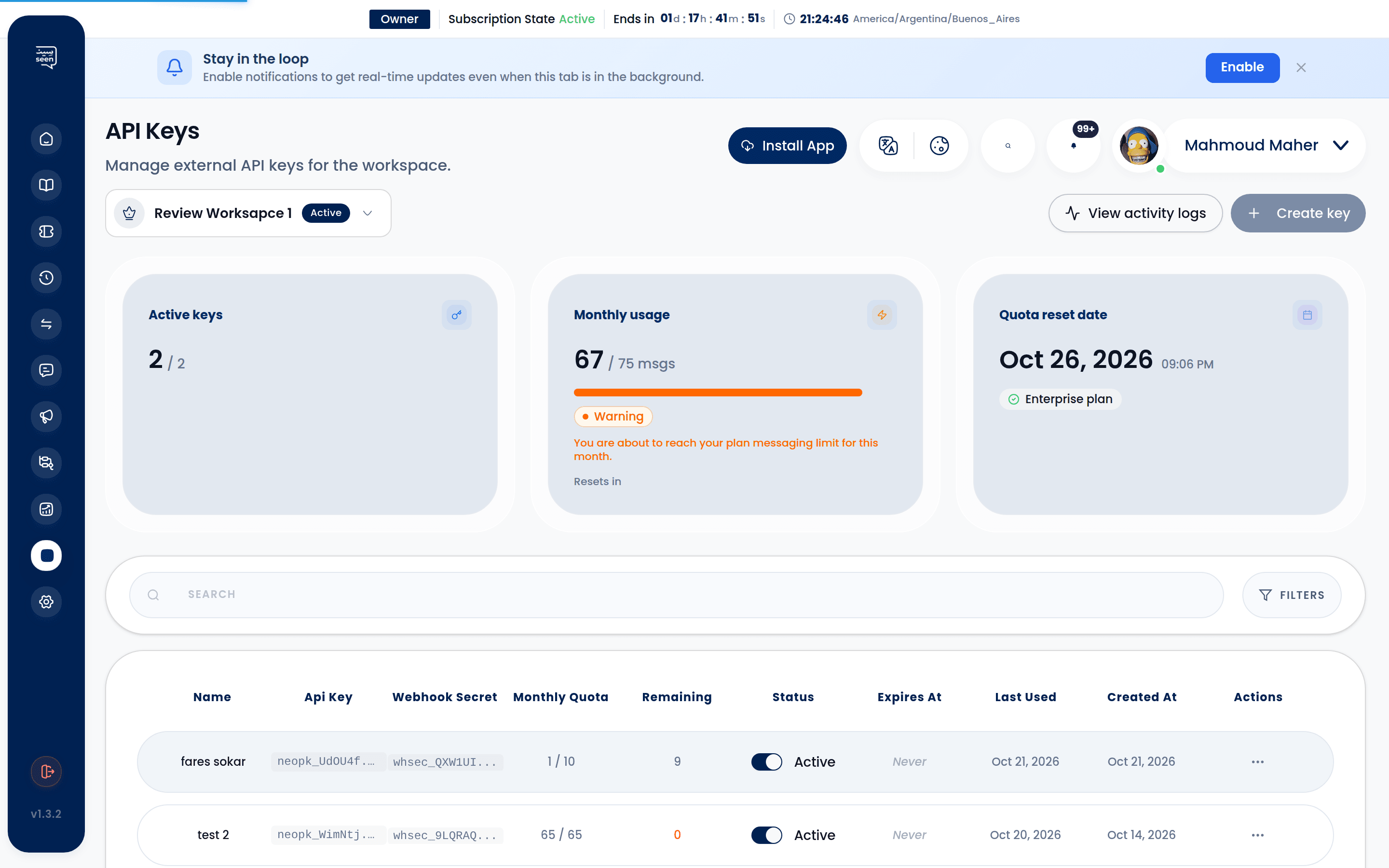
B) Scoped API Keys Management (API Keys)
- Generate isolated credentials with dedicated descriptors (e.g.
ERP Fulfillment PipelineorSalla Inbound Sync). - Granular Permission Scoping: Constrain keys to specific capabilities (e.g. dispatch outbound messages without granting access to export contacts).
- Consumption Limits: Establish maximum throughput rates (
rate_limit_per_minute) and monthly message consumption caps. - IP Address Allowlisting (
ip_allowlist): Enforce enterprise-grade network security by restricting API calls strictly to specified corporate server IPs.
C) Real-Time Telemetry & Request Inspector (API Logs)
- Immutable, millisecond-accurate audit ledger recording every inbound API request hitting your workspace.
- Highlights HTTP response status codes (200, 400, 401, 429, 500), execution latency, and originating IP addresses.
- Click any log entry to launch the
ApiLogDetailView, which displays complete request payloads and exact server responses for debugging.
D) Model Context Protocol (MCP Keys)
- Dedicated integration bridge for autonomous AI agents and large language models (such as Claude Desktop, Cursor IDE, and OpenAI Assistants).
- Empowers AI systems to perform agentic operations—reading tickets, fetching customer attributes, and replying to conversations—within verified permission boundaries.
3. Step-by-Step: Generating & Securing an API Key
- Navigate in the sidebar to External API and open the API Keys tab.
- Click the "Generate API Key" button.
- Supply a clear descriptor and establish an optional expiration timeframe.
- Select exact granular capabilities across permissions checkboxes:
messages:send: Authorize message and template dispatches.contacts:read/contacts:write: Query and update contact attributes.tickets:read/tickets:manage: Inspect ticket states, change priority, or reassign.
- (Optional) Provide authorized server IPs in the
IP Allowlistfield. - Click "Generate Key".
- The full unmasked token displays exactly once. Copy and store it immediately in your secure environment variable vault (
.env).
Warning: Never embed live API keys in client-side code, public GitHub repositories, or browser scripts. Compromised keys provide external entities with direct access to your messaging infrastructure.
4. Real-Time Webhooks Event Architecture
Webhooks push instantaneous HTTP POST notifications to your backend whenever high-value operational events occur inside Seen:
Standard Webhook Event Catalog
message.received: Dispatched the moment a customer sends an inbound message.message.delivered/message.read: Delivery receipts confirmed from recipient devices.ticket.created: A new conversation cycle initializes in the inbox.ticket.status_changed: Ticket transitions between New, In Progress, Closed, or Reopened.broadcast.completed: A mass promotional campaign concludes execution.
Cryptographic Signature Verification (HMAC SHA-256)
To protect your ingest servers against spoofing and replay attacks, Seen includes a cryptographic signature in every webhook header:X-Seen-Signature: <hmac_sha256_hash>
Compute the HMAC SHA-256 hash using your configured webhook_secret to verify authentic origin prior to processing payloads.
5. Code Implementations: Outbound Dispatches
A) Dispatch Message via cURL
curl -X POST https://seen-api.neop.co/api/user/v1/messages/send \
  -H "Authorization: Bearer YOUR_API_KEY" \
  -H "Content-Type: application/json" \
  -d '{
    "channel_id": 12,
    "recipient": "+966501234567",
    "message_type": "text",
    "text": "Hello Alex! Your shipment #8921 has been verified."
  }'
B) Dispatch WhatsApp Template via Python
import requests

url = "https://seen-api.neop.co/api/user/v1/messages/send-template"
headers = {
    "Authorization": "Bearer YOUR_API_KEY",
    "Content-Type": "application/json"
}
payload = {
    "channel_id": 12,
    "recipient": "+966501234567",
    "template_name": "order_shipping_update",
    "language": "en",
    "variables": {
        "1": "Alex Mercer",
        "2": "9823145",
        "3": "DHL Express"
    }
}

response = requests.post(url, json=payload, headers=headers)
print(response.json())
6. AI Agent Integration via Model Context Protocol (MCP)
Seen provides a native MCP server implementation, allowing modern AI development environments to orchestrate live customer operations:
- Provision an MCP key in the MCP Keys tab.
- Plug the connection coordinates into your MCP client configuration (e.g.
claude_desktop_config.json). - Available autonomous MCP Tools include:
send_message: Dispatches context-aware conversational replies.get_ticket_details: Ingests conversation transcripts and customer histories.assign_ticket: Escalates complex matters to specialized human agents.list_contacts: Fetches metadata attributes to enrich reasoning models.
7. HTTP Status Codes & Error Diagnostics
| Status Code | Description | Typical Cause | Resolution |
|---|---|---|---|
| 200 OK | Success | Request processed cleanly. | Continue application flow. |
| 400 Bad Request | Validation Failure | Invalid E.164 phone number or missing template variables. | Inspect response error payload for specific missing fields. |
| 401 Unauthorized | Authentication Error | Missing, malformed, or expired API key. | Confirm Bearer token formatting in request headers. |
| 403 Forbidden | Scope Restriction | Key lacks required permissions or IP is not allowlisted. | Revise key capabilities within the API Keys tab. |
| 429 Rate Limited | Velocity Exceeded | Burst requests exceeded configured requests-per-minute limit. | Implement exponential backoff algorithms. |
| 500 Server Error | Internal Processing Error | Downstream provider timeout or infrastructure issue. | Review API Logs telemetry and contact Seen Technical Support. |
Frequently Asked Questions
What is the default throughput rate limit for external API keys?
Standard API keys are provisioned with a baseline limit of 60 requests per minute per workspace. Enterprise subscription tiers can request elevated rate allowances up to 1,000+ requests per minute.
Can I deploy distinct API keys for staging and production backends?
Yes. We strongly advocate creating dedicated, independent API keys for each consuming application. This guarantees isolated telemetry in the API Logs tab and allows revocation of a compromised service key without impacting broader business systems.
How do I debug webhooks locally during software development?
Utilize secure reverse tunneling tools like ngrok to expose your local development port (e.g. localhost:8000) via a temporary public HTTPS URL, configuring that URL as your callback target within Seen for immediate live testing.